We may earn a commission when you buy through links on our deal pages, at no extra cost to you. It never changes which deals we post.
A tablet is one of the most useful things a family can own: cartoons on a road trip, homework, recipes in the kitchen, video calls with grandparents and a big screen for reading. But prices run from about $50 to well over $1,000, and the names (Fire HD, Galaxy Tab, iPad Air, iPad Pro) do not tell you much. This guide explains what actually matters, which tablet fits which person, and what a fair price is, so you can tell a real deal from a markdown on an old model.
Quick answer: which tablet should you buy?
For most families, the base iPad is the best all-round tablet: fast, easy for kids and adults, and supported with updates for years. If you mainly want streaming and reading on a budget, an Amazon Fire HD 10 or Samsung Galaxy Tab A11 does the job for far less. For young children, a Fire Kids tablet is the safest pick. Buy at least 64GB, and 128GB if it will hold games or downloaded shows.
Tablet buying cheat sheet
- Young kids: a Fire Kids tablet (case, parental controls and a 2-year replacement guarantee)
- Streaming and reading: Fire HD 10 or Galaxy Tab A11, ideally under $100 on sale
- School and long-term family use: the base iPad or a Galaxy Tab S10 FE
- Drawing, notes and work: iPad Air or Galaxy Tab S11 with a stylus
- Storage: 64GB minimum, 128GB if you can (iPads cannot add a memory card)
1. Pick the platform first: iPad, Android or Fire
- Apple iPad: the easiest to use and the biggest choice of apps and games. The current lineup is the base iPad (A16 chip), iPad mini, iPad Air (M4) and iPad Pro. iPads hold their value well and get updates for many years. Best if anyone in the house already uses an iPhone.
- Samsung Galaxy Tab (Android): full Google Play store, a microSD slot on most models, and Samsung DeX for a laptop-style screen. The Galaxy Tab A11 is the budget model, the Tab S10 FE is the mid-range pick, and the Galaxy Tab S11 series is the premium line, with the S Pen included in the box.
- Amazon Fire tablets: the cheapest way to get a decent screen for video, books and simple games. The lineup is the Fire 7, Fire HD 8, Fire HD 10 and Fire Max 11, plus Kids editions. Fire tablets use Amazon’s own app store, so some apps you know from Google Play (including many Google apps) are missing.
2. Screen size: 8, 10 or 11 to 13 inches
An 8-inch tablet is light and good for small hands, reading and travel. 10 to 11 inches is the sweet spot for most families: big enough for movies and split-screen homework, still easy to hold. 12 to 13 inches (iPad Air 13, iPad Pro 13, Galaxy Tab S11 Ultra) works as a laptop replacement for drawing or work, but it is heavy for kids and costs a lot more.
3. Storage and memory
Storage is where cheap tablets cut corners. 32GB fills up quickly once the system, a few games and offline shows are on it. 64GB is the realistic minimum, and 128GB is worth paying for if the tablet will last several years. Fire and most Galaxy tablets take a microSD card, so a cheap 128GB card fixes a small tablet. iPads cannot add storage later.
Memory (RAM) decides how smooth the tablet feels with several apps open. 3 to 4GB is fine for streaming and kids’ apps; 6 to 8GB or more helps with drawing apps, games and split-screen work.
4. Wi-Fi or cellular?
Wi-Fi models are cheaper and work for almost everyone, because you can share your phone’s hotspot in the car or on vacation. Cellular versions cost more up front and need a monthly data plan, so they make sense only if you use the tablet away from Wi-Fi every day.
5. Stylus and keyboard
For notes, schoolwork and drawing, check stylus support before you buy. The base iPad works with the Apple Pencil (USB-C), while the iPad Air, mini and Pro also work with the Apple Pencil Pro. Samsung’s Galaxy Tab S models include an S Pen in the box, which is real extra value. Fire tablets have limited stylus support. Add a keyboard case if a teenager will type essays on it.
6. Updates, kids’ safety and ads
- Software updates: iPads usually get iPadOS updates for about six years or more. Samsung promises up to seven years for recent Galaxy Tab models. Amazon promises security updates for at least four years after a Fire model stops being sold.
- Parental controls: every platform has them. Apple has Screen Time and Family Sharing, Samsung has Google Family Link and Samsung Kids, and Fire has Amazon Parent Dashboard with time limits and age filters.
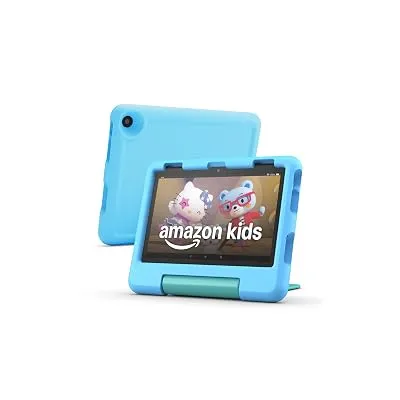
- Fire Kids editions: they come with a kid-proof case, one year of Amazon Kids+ and a 2-year worry-free guarantee: if the tablet breaks, Amazon replaces it. For a 4-year-old that is worth more than a faster chip.
- Ads on Fire tablets: regular Fire tablets show ads on the lock screen. You can pay a one-time fee to remove them, so count that in the price. Kids editions have no ads.
7. Refurbished and older models
A refurbished tablet can save money if it is a recent model with a real warranty, such as Apple Certified Refurbished or an Amazon Renewed listing with a guarantee. Be careful with older generations: a three or four year old iPad at a small discount may stop getting updates sooner, and the current model on sale often costs only a little more. Check the battery health and the return policy before you buy.
8. What is a fair price?
These are typical price ranges in the US. Prices change often, and sales around Prime Day, Black Friday and back to school drop them a lot.
| Level | Typical price | Tablets | Good deal |
|---|---|---|---|
| Budget | About $50 to $150 | Fire HD 8, Fire HD 10, Galaxy Tab A11, Fire Kids | Fire HD 8 under $60, Fire HD 10 under $90 |
| Mid-range (best value) | About $150 to $450 | Base iPad, Galaxy Tab S10 FE, Fire Max 11 | Base iPad under $300 |
| Premium | About $500 and up | iPad Air, iPad mini, Galaxy Tab S11, iPad Pro | $100 or more off the current model |
For example, we posted the base 11-inch iPad (A16, 128GB) at $274 last Black Friday and the Fire HD 8 at $54.99 during Prime Big Deal Days. Prices like these come back during big sales, so it pays to wait if you can.
9. Tablet deals live right now
We only post a tablet deal when the price is well below its usual price, and current models come first. This list updates on its own every few hours.
These are live right now (prices as of 10/28/26 1:21 PM ET; they change often, so check the final price before you buy):
See all Electronics deals, or get new deals as they drop on WhatsApp and Telegram.
More: see all Electronics deals and Apple deals, or join our free alerts to hear about the next tablet sale.
Frequently asked questions
What is the best tablet for kids?
For kids under about 8, a Fire Kids tablet is the easiest choice: it comes with a kid-proof case, parental controls, a year of Amazon Kids+ and a 2-year worry-free guarantee. For older kids who need it for school, the base iPad lasts longer and runs more apps, and Screen Time lets you set limits.
Is 64GB enough for a tablet?
64GB is enough for streaming, reading, email and a few games. If the tablet will hold lots of games, downloaded movies for travel or schoolwork, get 128GB. Fire and Galaxy tablets can add a microSD card later; iPads cannot.
Should I buy an iPad or a Fire tablet?
A Fire tablet is the cheapest way to watch videos, read and play simple games, but it uses Amazon’s app store, not Google Play. An iPad costs more but is faster, gets software updates for many years and runs almost every app, so it is the better long-term buy for school and work.
Do I need a tablet with cellular?
Most families do not. A Wi-Fi tablet works at home and anywhere you can share your phone’s hotspot. Cellular adds about $150 or more to the price plus a monthly data plan, so it only makes sense if you work on the road a lot.
How long do tablets get software updates?
iPads usually get iPadOS updates for about six years or more. Samsung promises up to seven years of updates for recent Galaxy Tab models. Amazon promises security updates for Fire tablets for at least four years after a model stops being sold, but they get fewer new features.
Can you remove the ads on a Fire tablet?
Yes. Most Fire tablets are sold “with lockscreen ads”. You can pay a one-time fee in your Amazon account to remove them, or buy the version without ads. Fire Kids tablets have no ads.
Is a refurbished iPad worth it?
It can be, if it is a recent model with a warranty, such as Apple Certified Refurbished or an Amazon Renewed listing with a guarantee. Avoid older generations that are close to the end of their updates, and compare the price with the new model on sale, which is often only a little more.