We may earn a commission when you buy through links on our deal pages, at no extra cost to you. It never changes which deals we post.
A smart home doesn’t have to be expensive or complicated. A $15 smart plug that turns on a lamp at sunset, a small camera that shows you the dog while you are at work, a doorbell that pings your phone when a package arrives: these are the upgrades people actually use every day. This guide covers what to buy first, how Echo, Ring and Blink fit together, and what a fair price is, so you can build a setup one piece at a time.
Quick answer: what should you buy first?
Start your smart home with one voice assistant: an Echo for Amazon households, a Google speaker for Google users or a HomePod mini for iPhone families. Then add pieces that solve real problems: smart plugs for lamps, a video doorbell for packages and an indoor camera for pets. Choose Matter plugs and bulbs so they work with any assistant.
Smart home starter cheat sheet
- Voice control on a budget: Echo Pop, often well under $30 on sale
- A screen for the kitchen: Echo Show 5 or Echo Show 8 (recipes, timers, camera views)
- Lamps and holiday lights: Matter smart plugs from Kasa, Tapo or Amazon, ideally under $10 each
- Packages and visitors: a battery video doorbell from Ring or Blink
- Pets and kids: Blink Mini or Ring Indoor Cam
- Plan for: a camera subscription if you want saved video clips
1. Should I pick Alexa, Google or Apple Home?
Pick the assistant that matches the phones and apps your household already uses. It becomes the “brain” of the house that controls your plugs, lights and cameras.
- Amazon Alexa (Echo): the widest choice of cheap compatible devices, and it works closely with Ring and Blink, which Amazon also owns. The lineup runs from the small Echo Pop and the Echo Dot to the Echo Studio speaker and Echo Show screens. Amazon says its newer assistant, Alexa+, is included with a Prime membership.
- Google Home: best if your family lives in Gmail, Google Calendar and Android. Google launched its Gemini-powered Google Home Speaker in 2026, and Nest cameras and doorbells plug straight into the Google Home app.
- Apple Home: best if everyone uses an iPhone. A HomePod mini or Apple TV acts as the home hub, and privacy controls are strong, but compatible gear tends to cost a little more.
2. Which Echo should I buy?
Buy an Echo Pop if you just want voice control, and an Echo Show 8 if you want a kitchen screen. The others suit more specific needs.
- Echo Pop: the cheapest way into Alexa. Fine for timers, weather, music in a small room and voice control of plugs and lights.
- Echo Dot: the newest Echo Dot, released in October 2026, has better sound than the Pop and is the first Dot with a built-in smart home hub. It launched at $99.99, so it costs more than older Dots did.
- Echo Show 5 and Echo Show 8: a screen adds recipes, a photo frame, video calls and a live view of your Ring or Blink camera when someone is at the door. The Show 5 fits a nightstand; the Show 8 is the better kitchen size.
- Echo Show 11 and Echo Show 16: big family-calendar displays. Nice, but not a starter purchase.
3. Are smart plugs worth it?
Yes. A smart plug is the cheapest, easiest first win: it goes between the wall and anything with an on/off switch, like a lamp, fan or holiday lights, so you can control it by voice, app or schedule.
- Look for Matter: Matter is a shared standard backed by Amazon, Apple, Google and Samsung SmartThings, so a Matter plug works with Alexa, Google Home and Apple Home.
- Outdoor plugs are weather-resistant and great for porch lights and holiday displays.
- Wi-Fi: most plugs need a 2.4 GHz Wi-Fi network.
Don’t run a space heater or other high-power appliance through a smart plug unless the maker says it is rated for it.
4. Smart bulbs or smart switches?
Use smart bulbs for a lamp or two, and a smart switch when one switch controls several bulbs. Bulbs need no wiring; a switch is cheaper for multi-bulb fixtures.
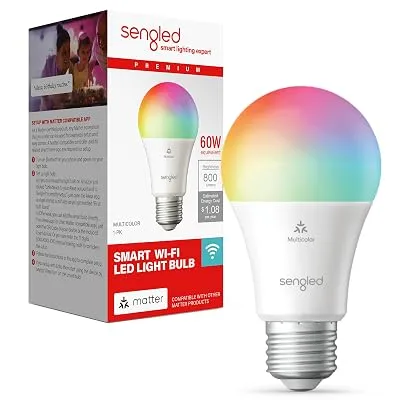
Philips Hue is the premium bulb choice, with excellent color and a bridge that keeps many bulbs fast and reliable. Budget brands such as Kasa, Wiz, Govee and Sengled connect straight to Wi-Fi and cost much less per bulb.
For a four-light ceiling fixture, one smart light switch beats four smart bulbs on price. Most need a neutral wire, so check your wall box first.
5. Which video doorbell is best: Ring, Blink or Nest?
Ring has the most choice, Blink costs the least and Nest fits best with Google Home. All three send a phone alert when someone rings or walks up, and you can talk to visitors from anywhere.
- Battery or wired: battery doorbells install in minutes and suit renters, but you recharge them every few months. Wired doorbells use your existing doorbell wiring and never need charging.
- Ring has the biggest range, from the Battery Doorbell up to wired Pro models with 4K video.
- Blink doorbells cost less and run a long time on batteries, with simpler features.
- Google Nest Doorbell is the natural pick if you chose Google Home.
6. What security camera should I start with?
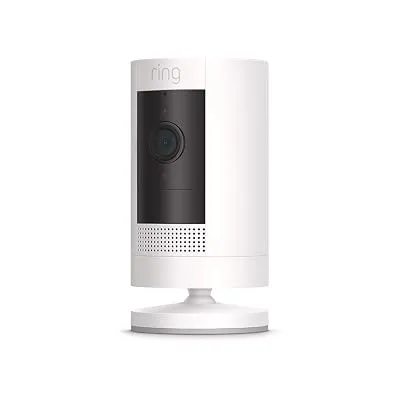
Start with a cheap indoor camera such as the Blink Mini or Ring Indoor Cam. They are small and great for watching pets, a baby’s room or the front hallway, and a pan-tilt version can turn to follow movement.
Outdoors, battery cameras such as the Blink Outdoor and Ring Outdoor Cam mount anywhere, while floodlight cams add bright lights but need power. For a driveway, 2K or 4K makes faces easier to read than 1080p.
7. How do I keep a smart home private and working?
Turn on two-step verification and use privacy modes. Then fix weak Wi-Fi, which causes most “device offline” problems.
Turn on two-step verification in the Ring, Blink, Alexa or Google app, and use “home mode” so indoor cameras stop recording when you are home. A mesh Wi-Fi system or extender fixes most dropouts.
8. What is a fair price?
A good deal is under $10 per smart plug, under $25 for an Echo Pop or indoor camera and under $60 for a battery video doorbell. These are typical US price ranges. Prices change often, and Amazon devices drop the most around Prime Day and Black Friday.
| Device | Typical price | Good deal |
|---|---|---|
| Smart plug | About $10 to $25 each | Under $10 per plug |
| Smart bulb (color) | About $10 to $50 per bulb | Under $10 per bulb for budget brands |
| Echo Pop | About $25 to $40 | Under $25 |
| Echo Show 5 or Show 8 | About $60 to $180 | Up to 40% off or more |
| Indoor camera (Blink Mini, Ring Indoor Cam) | About $20 to $60 | Under $25 |
| Battery video doorbell | About $50 to $100 | Under $60 |
For example, we posted the Blink Mini at $16.99 in October, the Ring Battery Doorbell 2K at $39.99 in September and a Kasa Outdoor Smart Plug at $14.99 during Prime Big Deal Days. Prices like these tend to come back during big sales.
If you are buying at Best Buy, Target or Home Depot, check our discounted gift cards first. Paying with a gift card bought at a discount stacks on top of the sale price, and our guide to stacking gift cards with Black Friday prices shows how.
9. Smart home deals live right now
We only post a smart home deal when the price is well below its usual price, and this list updates on its own every few hours.
These are live right now (prices as of 11/20/26 1:21 PM ET; they change often, so check the final price before you buy):
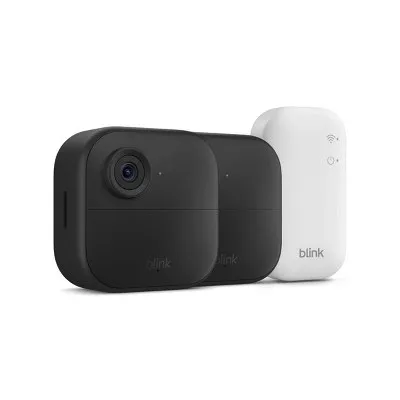
Blink Outdoor 4 Wireless Security Camera with Sync Module Core (2-Camera System): 65% Off at Target
$44.99 $129.99 up to 65% off
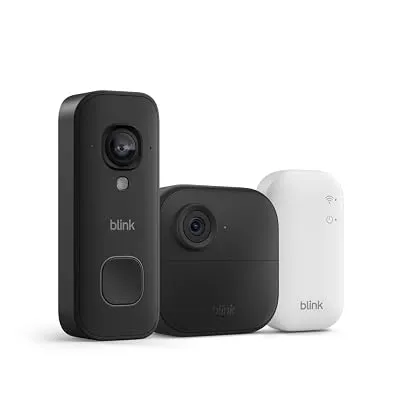
See all Amazon Devices deals, or get new deals as they drop on WhatsApp and Telegram.
More: see all Amazon Devices deals and Electronics deals, read how to spot a fake Black Friday deal, browse our buying guides, or join our free alerts to hear about the next Echo, Ring or Blink sale.
Key takeaways
- Matter-certified devices work across Alexa, Google Home and Apple Home, so switching assistants later doesn’t strand your plugs and bulbs.
- The October 2026 Echo Dot is the first Dot with a built-in smart home hub and launched at $99.99.
- Ring Solo, Ring’s cheapest plan, costs $4.99 a month to save video from one device.
- Ring and Blink products still give live view and alerts without a paid plan.
Frequently asked questions
What is the best first smart home device?
For most people, a smart plug is the best first smart home device. It costs little, takes a couple of minutes to set up and turns any lamp or string of holiday lights into something you can control by voice, by app or on a schedule. Add a speaker such as an Echo Pop later if you want hands-free voice control.
Do I need a hub for a smart home?
You don’t need a hub to start. Most Wi-Fi plugs, bulbs and cameras connect straight to your router and an app. A hub helps once you have many devices or want Matter and Thread gear to respond faster. Some Echo speakers and displays, Google Nest speakers and the HomePod mini can act as that hub.
What does Matter mean on a smart plug or bulb?
Matter is a shared smart home standard backed by Amazon, Google, Apple and Samsung SmartThings. A plug or bulb with the Matter logo can work with Alexa, Google Home and Apple Home, so you can switch assistants later without replacing your devices. It is worth looking for when you buy anything new.
Ring or Blink: which should I buy?
Buy Blink for a simple, low-cost setup: it is cheaper and its battery cameras last a long time. Buy Ring if you want more models, wired and 4K options and more features, including 24/7 recording on its top plan for eligible wired cameras. Amazon owns both, and both work with Alexa and Echo Show screens.
Do Ring and Blink cameras need a subscription?
Ring and Blink cameras work without a subscription for live view and motion alerts, but saving and replaying video clips needs a paid plan. Ring’s cheapest plan, Ring Solo, costs $4.99 a month for one device. Some Blink setups can store clips on a USB drive through a Sync Module 2 instead of paying monthly.
Is Alexa+ free?
Alexa+ is included at no extra cost with an Amazon Prime membership, according to Amazon. It works across recent Echo devices, the Alexa app and Alexa.com. If you don’t have Prime, check Amazon’s current Alexa+ pricing before you buy an Echo mainly for the new assistant, since the hardware alone doesn’t include it.